
Microsoft Technical Bulletins

The latest updates for all the Microsoft Products you use every day.

Microsoft Stream Curtain Reveal Tech Bulletin Header

Written by Richard

In a world where information technology has become complex and untenable we remove all your frustrations dealing with the overwhelming complications by simplifying technology decisions, budget management and implementation.

Categories: Stream

January 11, 2022

Blog Home

Microsoft Stream: Add or Edit captions

Microsoft Stream: Add or Edit captions and transcript for a video in SharePoint or OneDrive

From Microsoft Corporation
Technical Bulletin MC312492 · Published Jan 8, 2022

Stream, Microsoft 365

StreamTagNEW FEATUREUSER IMPACT

Message Summary

This new feature will enable users, with edit permission to a video stored in OneDrive for Business or a SharePoint document library, to upload, download, and delete captions in the WebVTT file format. This feature will also let users download a Teams Live Transcript as a WebVTT file. They will then be able to edit that file in a text or VTT editor and re-upload it to provide more accurate captions and transcript for their recording.

Any viewer of the video with a transcript will be able to display it as closed captions inside the video player and as a transcript in the transcript pane next to the video .

This message is associated with Microsoft 365 Roadmap ID 85610.

When this will happen:

Targeted release (entire org): will start rolling out early March and be complete by end of March.

Standard: will start rolling out in early April and be complete by end of April.

How this will affect your organization:

A user who does not have a transcript, but has edit permission on a video will be able to navigate to Media Settings in the player and use the Transcript and captions setting to upload captions. Users will also be able to download and delete the caption file.

Comments toggle
View image in new tab

Any viewer will be able to enable captions during playback via the Closed Captions button and will be able to see transcript in transcript pane.
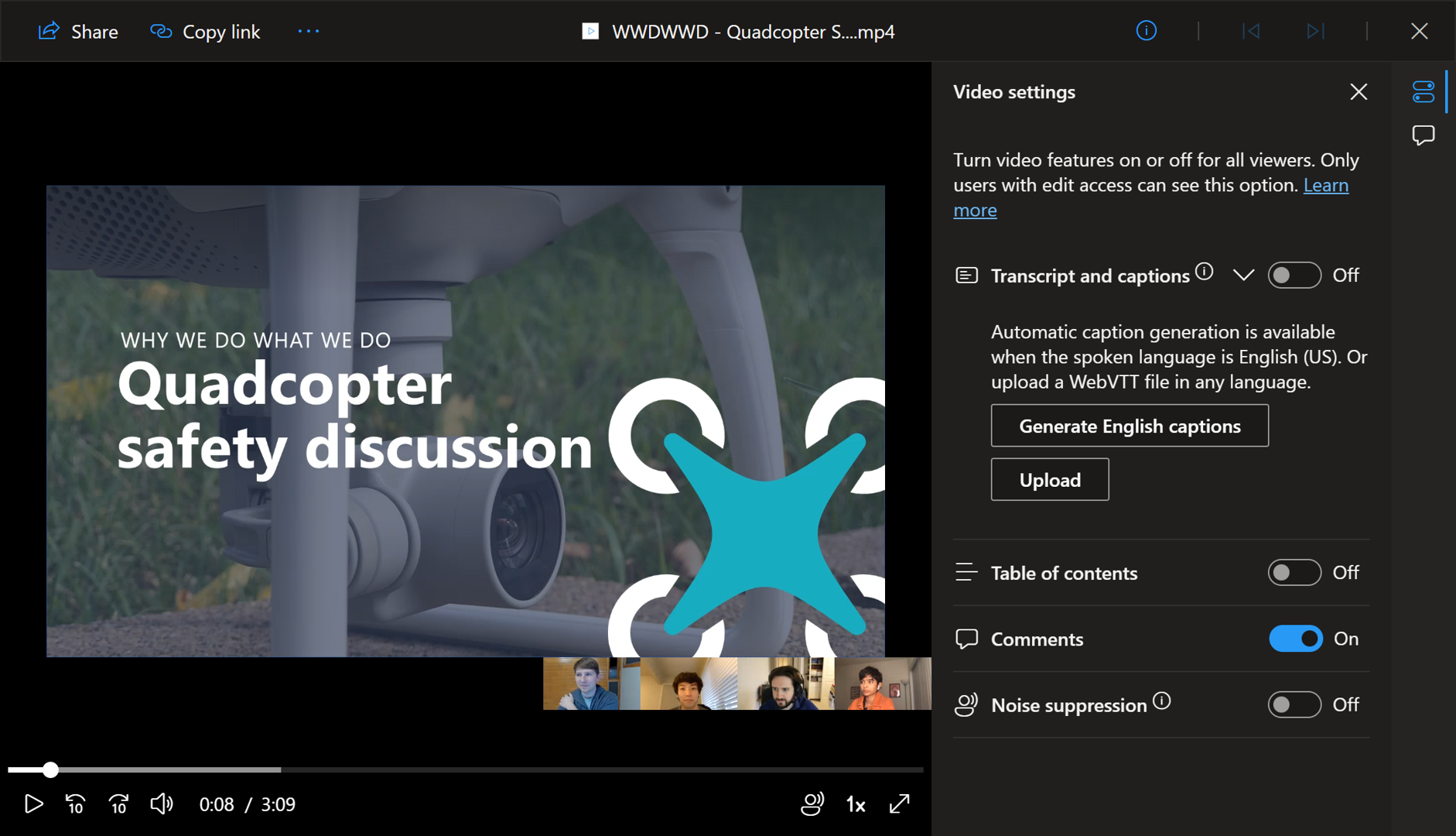
Generate Captions
View image in new tab

You might want to notify your users about this new capability and update your training and documentation as appropriate.


TECHNICAL BULLETIN END

QuixTec provides this and other technical bulletins unaltered from Microsoft. As an authorized Microsoft Partner, we ensure that all our solutions we deliver to you include the latest Microsoft updates.

ABOUT US: QuixTec, LLC is a U.S. certified Veteran Owned, modern DevOps organization with experience in a plethora of IT Software Languages.  As a Microsoft Partner, we specialize in Discounted Microsoft Software Licensing, Microsoft SharePoint, Microsoft365 and HTML5 technologies for small to enterprise-sized organizations. Our dedication to IT excellence is evidenced through our PECB ISO Certification training center. The only PECB ISO authorized center in Washington State. QuixTec, implements and provides training for upcoming open-source digital marketing services that are taking the industry by storm. This solution, used by over 100,000 businesses, provides enterprise level marketing capabilities at startup rates. The founder, Richard, has 30 years of experience working with several notable companies that include World Vision, Expedia, Microsoft, Levi Strauss, NASA, Boeing Aerospace, Los Alamos National Laboratory, and the U.S. Air Force, to name a few.  QuixTec is in the Seattle area. Phone today for a free consultation and project estimate.

(425) 367-9025

LEARN MORE

SharePoint Development Services – SharePoint Development - SharePoint Consultancy Services - Custom Solution Development - Microsoft 365 Experts - Microsoft 365 - IT Staffing Services - WordPress Development Services - Form Email Validation - Microsoft Licensing - Mautic Open Source Marketing – Best IT Staffing Agencies – IT Staffing Company  - PECB ISO Training and Certification

You May Also Like…