


Microsoft Viva, Microsoft 365 Experts
From Microsoft Corporation
Technical Bulletin MC428508 · Published Sep 9, 2022
Message Summary
When composing an email in Outlook, users will see schedule send suggestions with a suggested time that aligns with working hours. Schedule send suggestions (formerly Delay delivery plan) will be available with default on. A Global admin or an Exchange Online admin role can configure tenant level settings in the Microsoft admin center.
- With Schedule send suggestions turned on, users with Insights by MyAnalytics service plan can get up to three daily schedule send suggestions and users with MyAnalytics (Full) service plan or Viva Insights subscription can get an unlimited number of suggestions for delaying email delivery to their coworkers.
- With schedule send suggestions turned off, Microsoft users will not get any schedule send suggestions.
This message is associated with Microsoft 365 Roadmap ID 98128
When this will happen:
The change to have this feature default on will begin rolling out in late September and is expected to be completed by late October.
How this will affect your organization:
Schedule send suggestions help minimize disruptions to recipients outside their working hours or when they’re away from work. It helps anybody who wants to maintain the flexibility to work when they want without putting the burden of their schedule on others. Schedule send suggestions are currently available in the latest versions of Outlook on the web and Outlook for Windows.
Schedule send suggestions will be on by default, but can be opted out by admin or users as follows:
Admins can configure access for users at the tenant level in Microsoft admin center. These will be default settings for all users. Users can change them at any time from their Viva Insights Outlook add-in and dashboard settings page.
- Sign in as a Global admin or an Exchange Online admin to the Microsoft 365 admin center.
- Make sure you’re using the new admin center. To do this, if the switch in the upper right of the page reads Try the new admin center, select it so that it reads The new admin center.
- In the left pane, expandSettings, and then select Org settings.
- Under Services, select Viva Insights to see settings for the different options.
- Select Schedule send suggestions to keep all Viva Insights users in your organization opted in for access to schedule send suggestions. Deselect Schedule send suggestionsto opt users out.
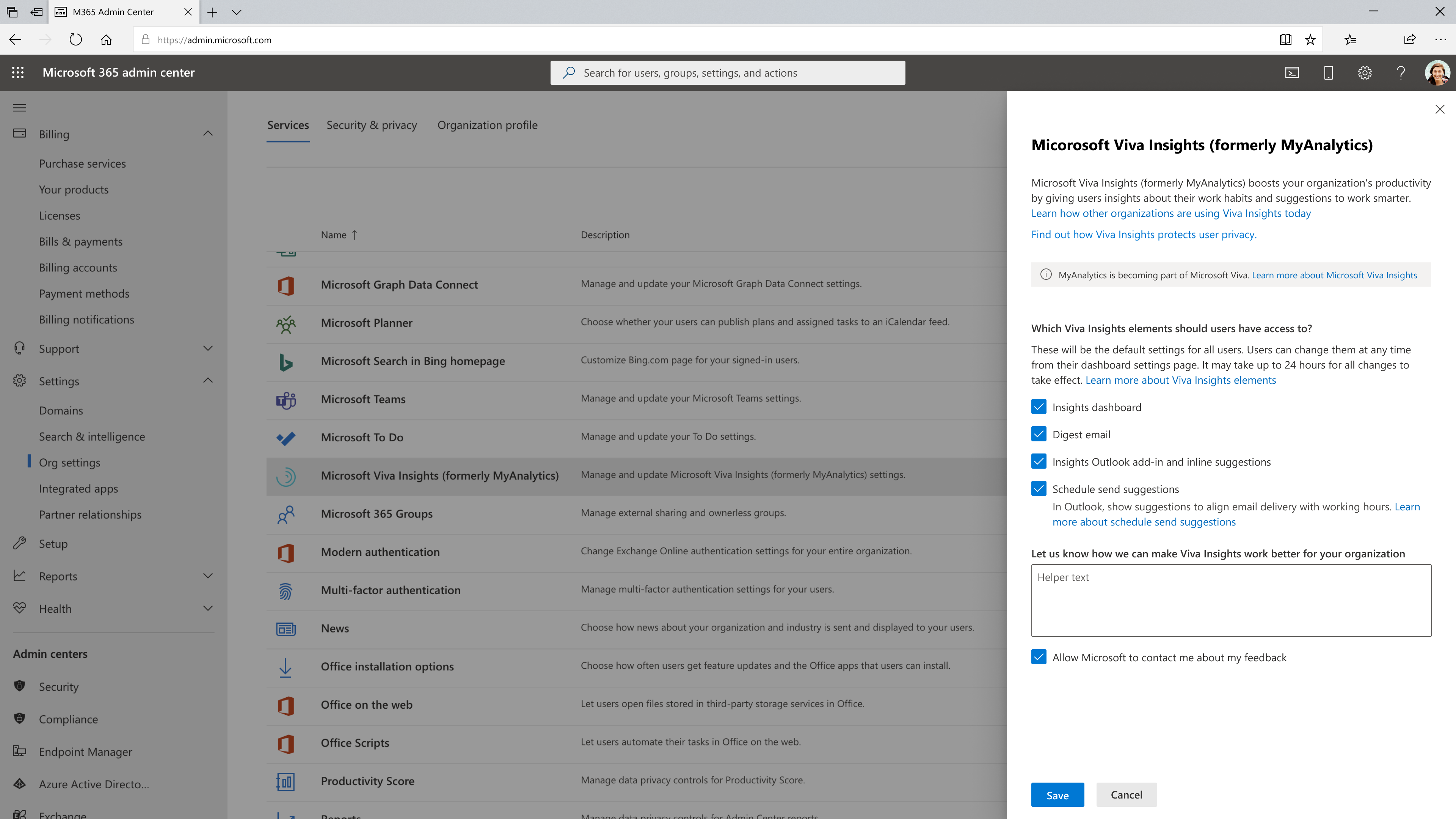
Note: It may take up to 24 hours for all changes to take effect.
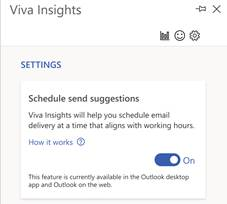
Individuals can also turn schedule send suggestions on or off through their own Settings within the Viva Insights add-in in Outlook by following the steps below.
- To opt out of schedule send suggestions in Outlook, select the Viva Insights icon on the Outlook Home ribbon. Or if you are using Outlook on the web, theViva Insights icon is in the ellipsis(…) menu when reading an email message or when sending a new message.
- Select the Settings(gear) icon in the Viva Insights add-in.
- In Settings, forSchedule send suggestions, change the setting to Off.
What you need to do to prepare:
Review and assess the impact for your organization. You might want to notify your users about this change and update your training and documentation as appropriate.