


MC470147, Microsoft 365 Suite, Microsoft 365 Experts, Whiteboard for the Web
From Microsoft Corporation
Technical Bulletin MC470147 · Published Nov 23, 2022 · Last updated Feb 14, 2023
Message Summary
Updated February 14, 2023: We have updated the rollout timeline below. Thank you for your patience.
The ability to copy/paste live Loop components from other Microsoft 365 apps (such as Teams) is coming soon to Whiteboard for the web, Whiteboard app in Teams, and Whiteboard for Windows.
This message is associated with Microsoft 365 Roadmap ID 98161
When this will happen:
This began rolling out starting in early January and is expected to be completed by mid-March.
How this will affect your organization:
Users will be able to copy/paste, view and edit live Loop components in Whiteboard. This functionality is controlled by the Create and view Loop files in Microsoft apps that support Loop OCPS policy, which applies to all Microsoft apps that support Loop components.
You can use this policy to enable or disable access for individual users.
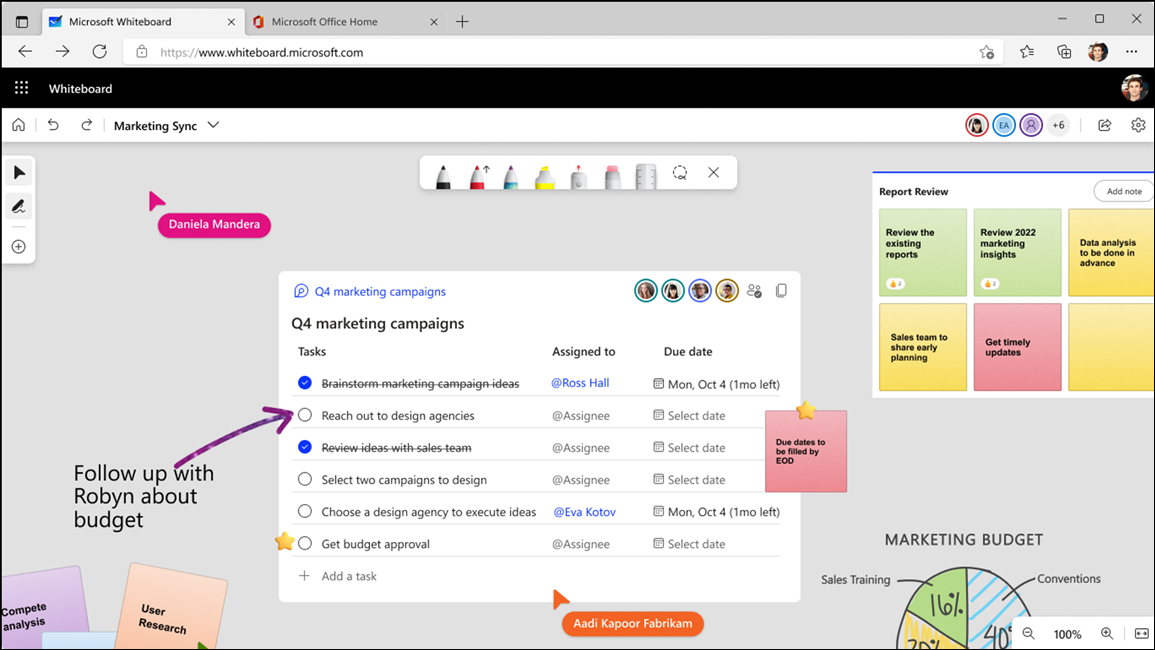
Note: On mobile devices, users can view and edit Loop components in Whiteboard but will not be able to copy/paste them. This functionality will be coming in a future update.
What you need to do to prepare:
No change is necessary, unless you wish to disable the Loop functionality in Whiteboard and other MS365 apps. To do this, you can use the Office cloud policy service in the Microsoft 365 Apps admin center.
- Sign in to https://config.office.com/ with your Microsoft 365 admin credentials.
- Select Customization from the left pane.
- Select Policy Management.
- Create a new policy configuration or edit an existing one.
- In Choose the scope, choose the security group for which you want to apply the policy.
- In Configure Settings, choose Create and view Loop files in Microsoft apps that support Loop.
- In configuration setting, choose either – enabled, disabled, or not configured. The implication of each of these options is mentioned below:
-> Enabled: Loop functionality is available to users
-> Disabled: Loop functionality isn’t available to users
-> Not configured:Loop functionality is available to users
- Save the policy configuration.
- Reassign priority for any security group if required (If two or more policy configurations are applicable to the same set of users, the one with the higher priority is applied).
- In case you create a new policy configuration or change the configuration for an existing policy, there will be a delay in the change being reflected as mentioned below:
-> If there were existing policy configurations prior to the change, then it will take 90 mins for the change to be reflected.
-> If there were no policy configurations prior to the change then it will take 24 hours for the change to be reflected.
To learn more, visit the Microsoft Whiteboard Help Hub page.